
ENCORE ARTS SUITE
COMPETITION MANAGEMENT REIMAGINED

The Complete Platform for Arts
Competitions
Streamline applications, video adjudication, judging rounds, advancement, awards, payments, notifications, and reporting in one structured platform.
Replace disconnected forms, spreadsheets, emails, and scoring files with one organized competition workflow.
Encore Arts Suite brings the competition season into one structured platform. Applicants, administrators, reviewers, and judges work from the same current information—without scattered documents or manual status tracking.
Simplify Administration
Manage seasons, divisions, categories, applications, payments, judging rounds, and awards from one organized tenant workspace.
Improve the Applicant Experience
Give applicants a clear path from account creation and application entry through payment, submission, and status updates.
Create a Consistent Judging Process
Assign judges, configure rubrics, collect scores and comments, advance finalists, and preserve historical results.
Manage every stage of the competition season in one platform.
From season setup and application intake through judging, finalist advancement, awards, and historical records, Encore Arts Suite keeps the complete workflow connected.
Configure the Season
Set dates, divisions, categories, instruments, fees, requirements, and competition rules.
Accept Applications
Applicants create accounts, enter repertoire and recording information, complete required fields, and pay application fees.
Review and Approve
Review submissions, request corrections, approve applications, authorize fee waivers, and prepare applicants for judging.
Conduct Judging
Create rounds, assign judges, apply rubrics, collect scores and comments, and monitor completion
Advance Finalists
Advance selected applicants into later rounds while preserving prior-round history.
Record Awards and Results
Assign category awards, overall winners, and final placements, then retain the completed season as a historical record.
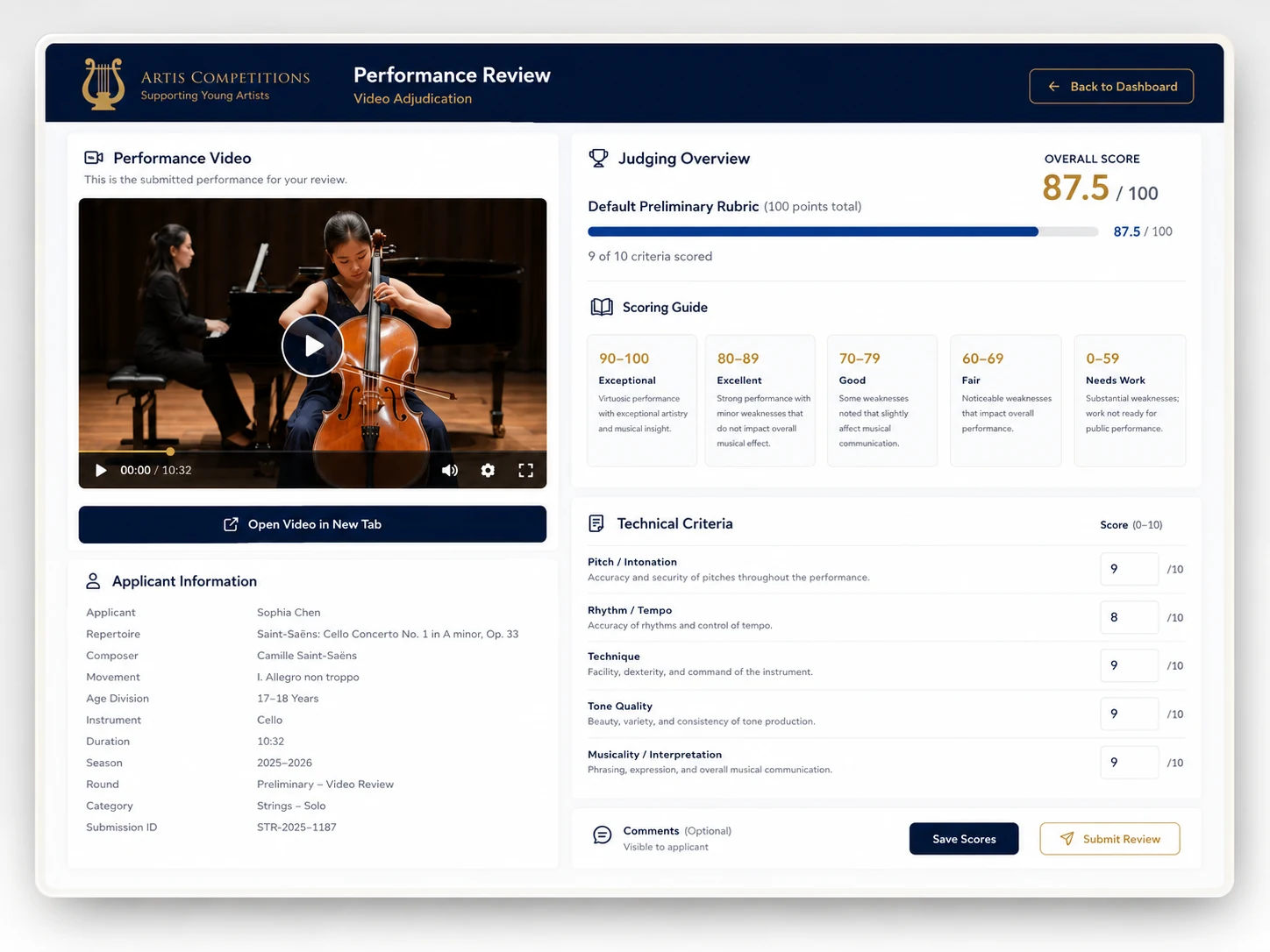
Watch, score, and comment without leaving the judging workspace.
Applicant performance recordings remain linked to the correct application and judging round. Assigned judges can watch the recording, apply the approved rubric, save drafts, submit scores, and provide comments from one organized screen.
Everything administrators need to manage a complete season.
Encore Arts Suite brings applications, payments, competition setup, judging, advancement, awards, and tenant administration into one connected workspace.
Applications
Guide applicants through a structured multi-step workflow with draft saving, validation, repertoire details, recording information, and submission history.
Payments
Track application fees, payment status, authorized fee waivers, and the separate completion of payment and final application submission.
Competition Setup
Configure seasons, divisions, categories, instruments, eligibility rules, fees, requirements, and competition-specific settings.
Judging
Create competition rounds, assign judges, apply approved rubrics, collect scores and comments, and track review completion.
Advancement and Awards
Advance selected applicants into later rounds, preserve round history, and record category awards, overall winners, and final placements.
Tenant Administration
Manage organization settings, tenant users, invitations, role-based access, season assignments, and the organization-specific workspace.
Give every participant a clear, role-specific experience.
Applicants, judges, and competition administrators each see the tools and information relevant to their responsibilities—without navigating the entire platform.
Applicants and Families
Save progress, complete required application sections, submit recording information, pay fees, receive confirmation, and return later to review application status.
Judges and Adjudicators
Review assigned applications, watch submitted recordings, use the approved rubric, save drafts, submit scores and comments, and work within the correct judging round.
Competition Administrators
Monitor applications, payments, reviews, assignments, advancement, awards, users, and season progress from one organization-specific workspace.
See the status of the season without rebuilding reports by hand.
Encore Arts Suite gives tenant administrators one current view of application, payment, judging, advancement, and award activity.
Total Applications
View the current number of applications received for the active season.
Awaiting Review
Identify applications that still require staff review, corrections, approval, or another administrative action.
Reviews Completed
Monitor submitted judge reviews and see where scoring work remains incomplete.
Finalists Advanced
Track applicants selected for later rounds while preserving earlier judging history.
Paid and Waived Applications
See which applications are paid, waived, pending, or still require payment-related follow-up.
Judge Assignment Progress
Track judge assignments and identify applications or rounds that still need adjudicator coverage
Awards Recorded
Confirm category awards, overall winners, and final placements before completing the season record.
Give each organization a secure, independent competition workspace.
Each organization manages its own seasons, users, applicants, judges, payment settings, scoring records, awards, and historical results within an organization-specific workspace.
Organization-Specific Workspace
Manage seasons, applicants, judges, scoring records, awards, settings, and historical results within a workspace dedicated to the organization.
Role-Based Access
Give tenant administrators, season managers, judges, reviewers, and applicants access only to the tools and competition information relevant to their responsibilities.
Payment and Record Control
Monitor applications, payments, reviews, assignments, advancement, awards, users, and season progress from one organization-specific workspace.
Designed for responsible competition administration.
Human judges remain authoritative. Encore Arts Suite supports structured access, controlled workflows, historical competition records, and organization oversight without replacing adjudicator judgment.
Support categories, divisions, rounds, and awards that match your organization.
Encore Arts Suite is competition-first while allowing each organization to configure its own divisions, categories, judging rounds, rubrics, and awards.
Young Artist and Concerto Competitions
Support soloist, concerto, and young artist competitions with flexible divisions, application requirements, adjudication rounds, and awards.
Orchestra, Symphony, and Instrumental Competitions
Manage competitions for orchestras, symphonies, piano, strings, winds, brass, and other instrumental disciplines within one adaptable structure.
Multi-Category Music Competitions
Run competitions spanning multiple instruments, age groups, repertoire types, divisions, or performance categories without forcing every program into the same format.
Arts Nonprofit and Scholarship Programs
Support nonprofit competitions, scholarship awards, educational programs, and mission-driven arts initiatives with structured review and recognition workflows
Designed by a software engineer who has spent decades inside young artist competitions.
Encore Arts Suite was shaped by 28 years of direct young artist competition experience, including 15 years of community-orchestra board service while also performing as a playing member. Combined with decades of software engineering experience, that perspective produced a platform built around how these competitions actually operate.
28 Years
Direct experience supporting and administering young artist competitions across multiple seasons.
15 Years
Community-orchestra board service with direct responsibility for organizational planning and competition oversight.
Performing Member
Firsthand understanding of the orchestra, musician, applicant, family, and adjudicator perspectives.
28 Years
Software engineering experience applied to building structured, maintainable, and purpose-built competition workflows.
Purpose-built for performing arts competitions—not adapted from generic form software.
The application workflows, judging controls, advancement structure, awards process, and historical season records reflect direct experience with how young artist competitions are actually administered.
A structured path from setup to opening applications.
Sands TechVision works with pilot organizations to configure the platform, validate workflows, and prepare administrators and judges before applications open.
Organization and Season Discovery
Review the organization’s competition structure, season timeline, divisions, categories, eligibility rules, payment needs, and judging process.
Tenant Configuration
Configure the organization workspace, branding, users, roles, season access, and core administrative settings.
Judging and Rubric Configuration
Description
Create judging rounds, assign judges, configure rubrics, define scoring criteria, and validate advancement rules.
Application and Payment Setup
Description
Set application requirements, fees, payment handling, waivers, validation rules, confirmations, and submission steps.
Validation and Launch Support
Description
Test the complete workflow, confirm administrator and judge readiness, resolve launch issues, and prepare to open applications.
Practical guidance for planning and managing successful young artist competitions.
Explore articles on competition administration, applicant experience, judging workflows, season planning, payments, communications, awards, and technology for performing arts organizations.
JUDGING AND ADJUDICATION
Designing a Fair and Consistent Competition Judging Workflow
Learn how clear rubrics, assigned review queues, scoring standards, comments, and completion tracking can support a more consistent adjudication process.
SEASON PLANNING
From Applications to Awards: Mapping the Full Competition Season
Understand how application intake, review, payment, judging, advancement, awards, and historical records fit into one connected season plan.
Answers to common questions about competition setup, judging, payments, and season records.
Learn how Encore Arts Suite supports the practical decisions organizations make when managing applications, adjudication, fees, and completed competition seasons.
Encore Arts Suite is designed for young artist concerto competitions, orchestra and symphony competitions, piano competitions, strings competitions, winds and brass competitions, and other multi-category performing arts competitions. Organizations can configure their own seasons, divisions, categories, judging rounds, rubrics, and awards.
Yes. Applicants can submit supported hosted-video links, including YouTube recordings. Assigned judges can view the performance recording within the judging workspace while completing scores, comments, and the approved rubric.
Yes. Administrators can create preliminary, semifinal, final, or other competition-specific rounds. Judges can be assigned by round, finalists can be advanced, and prior-round scores and decisions can be preserved.
Each competition organization connects its own Stripe account and receives application fees directly. Encore Arts Suite records the payment status and supports fee waivers and refund reconciliation, while Stripe handles payment processing and payouts.
No. Payment and final submission are separate steps. Applicants must complete all required information, pay or receive an authorized fee waiver, and then submit the finished application.
Yes. Completed applications, judging records, finalist advancement, awards, and results can be retained as historical season records, giving administrators a consistent archive from year to year.
Ready to simplify your next competition season?
See how Encore Arts Suite can support applications, payments, video adjudication, judging, advancement, awards, and results in one organized platform.