Guide each competition season from setup to completed results
Encore Arts Suite gives administrators a structured path for configuring the season, accepting and reviewing applications, coordinating human adjudication, advancing selected applicants, recording awards, and retaining the completed season record.
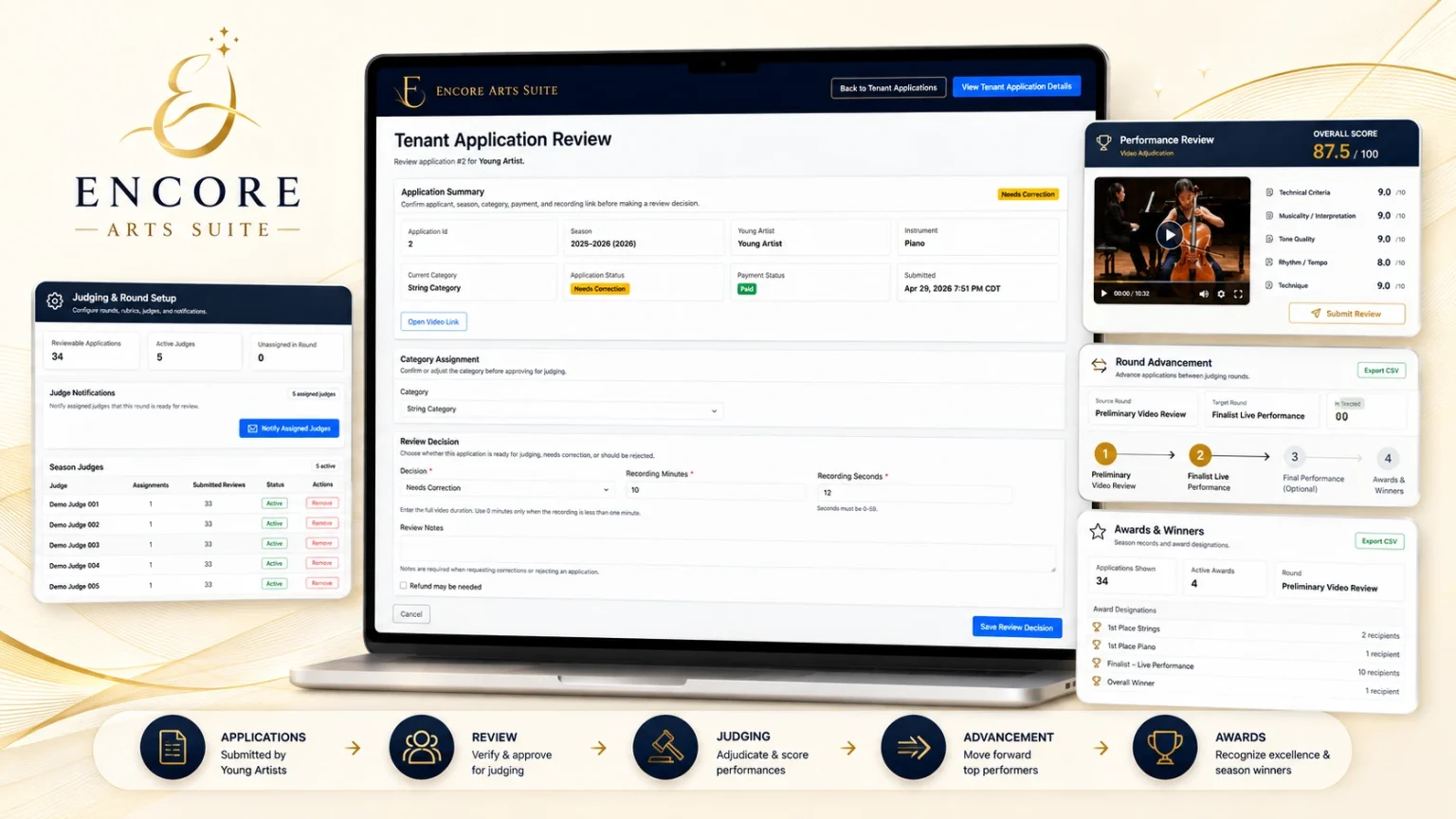
Follow the competition from preparation through completion
Each stage remains connected within the season record while authorized administrators and judges control approvals, adjudication, advancement, awards, and completion decisions.
Configure the season and confirm readiness before opening
Set the season dates, application fee, competition structure, instrument mappings, judging rubric, and other required settings. Before applications open, administrators should review the configuration and resolve any remaining setup reminders.
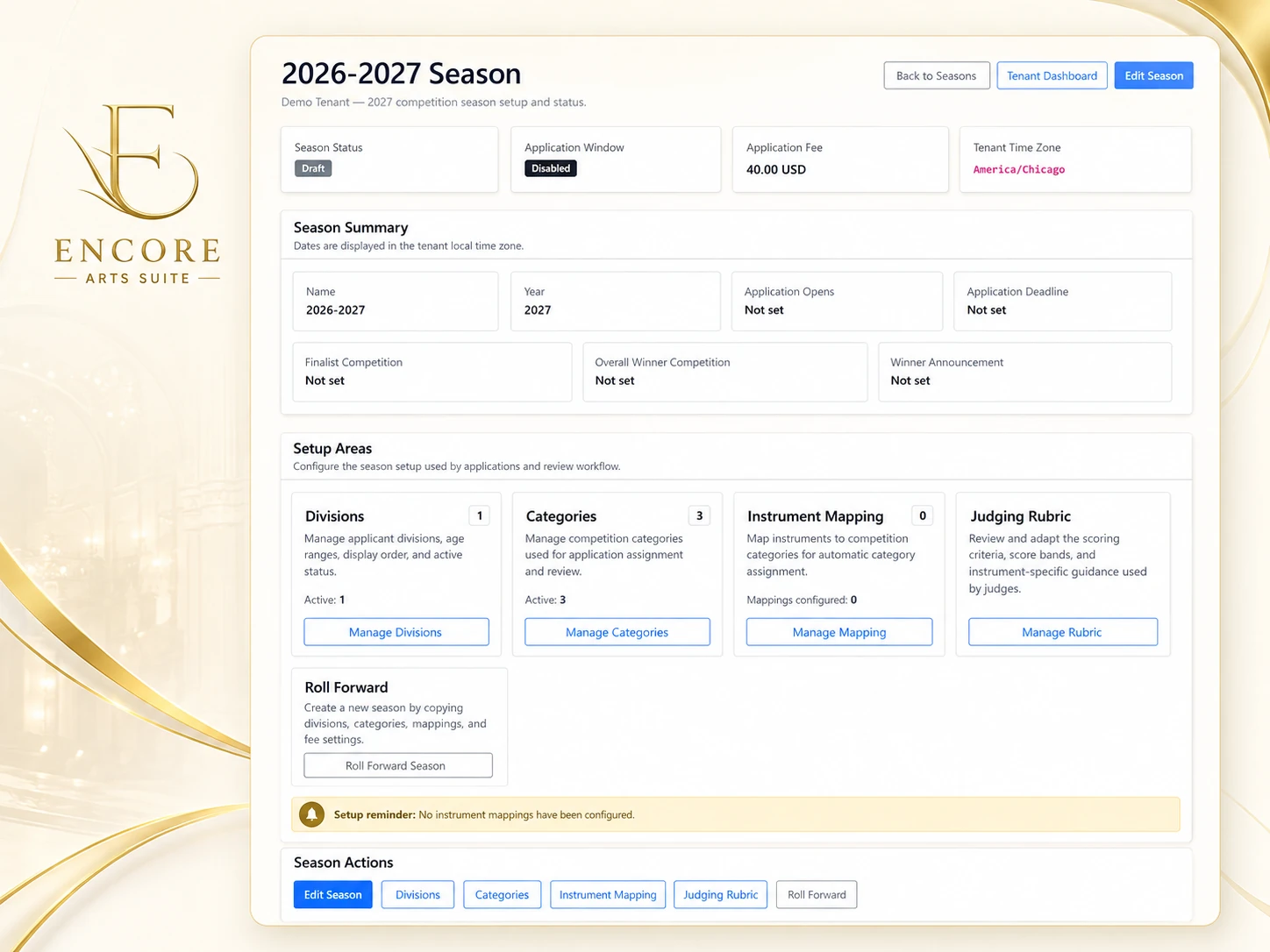
Establish the competition structure
Encore Arts Suite keeps season-level dates, divisions, categories, instrument mappings, fees, and judging criteria connected within one administrative setup area.
Season Configuration
Define the season name, year, important dates, application window, fee, and tenant time zone.
Divisions and Categories
Organize applicants by age, experience, instrument family, or other tenant-defined competition structures.
Instrument Mapping
Connect instruments to the appropriate competition categories before applications are reviewed.
Judging Rubric
Prepare round-specific scoring criteria, score bands, and guidance that authorized judges will use.
Readiness check: Completing the setup fields does not automatically make the competition ready to open. Administrators should confirm required dates, mappings, fees, judging criteria, and any displayed setup reminders before accepting applications.
Open applications and collect complete submissions
Give applicants a structured path for entering personal details, competition selections, repertoire, recording information, and payment status before reviewing and submitting the completed application.
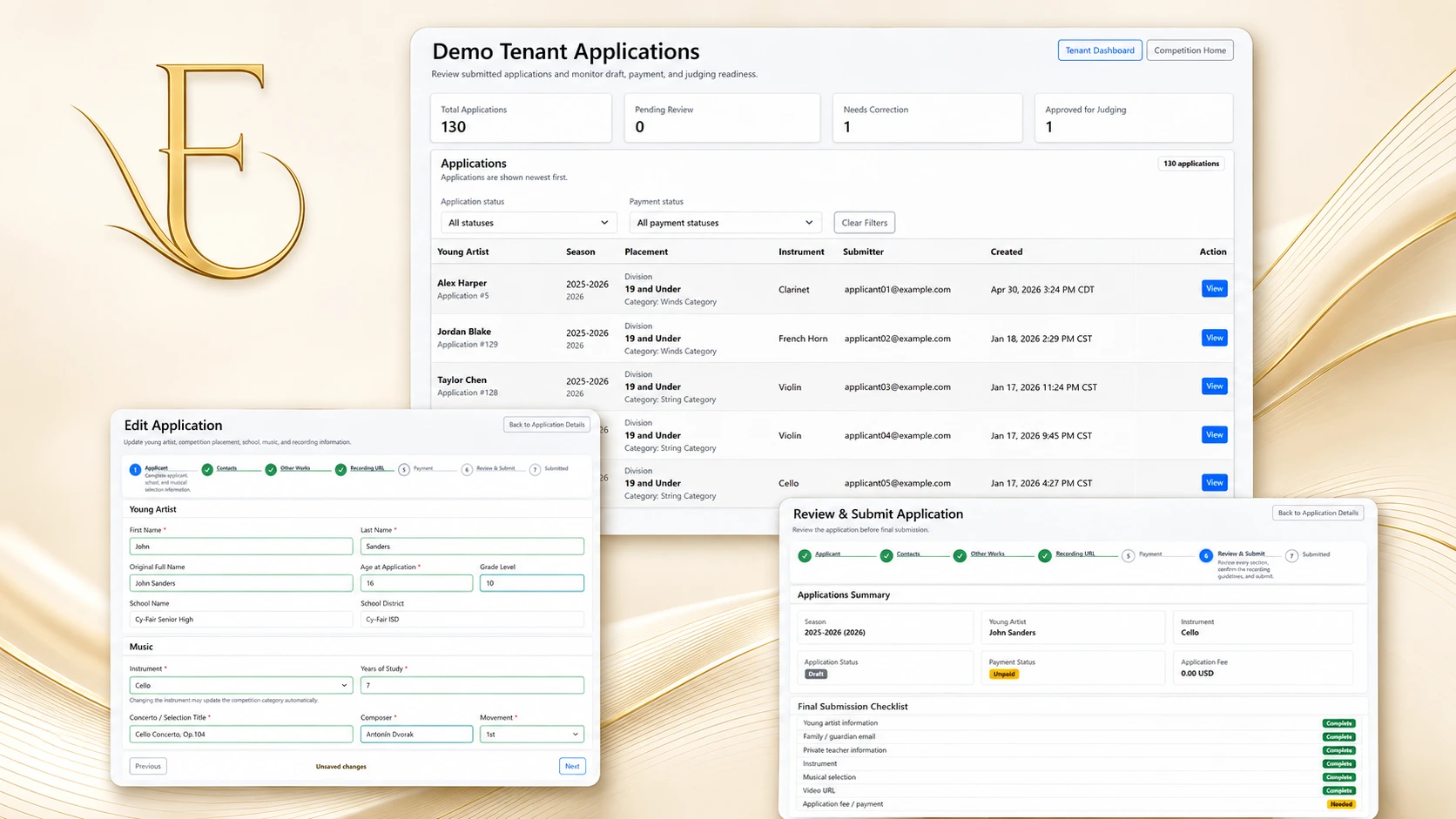
Guide applicants from entry to final submission
Applicants move through structured steps while administrators retain visibility into draft, payment, submission, correction, and judging-readiness states.
Judge Assignments
Connect authorized judges to the appropriate season, judging round, division, category, instrument, or application.
Repertoire and Recording
Capture instrument, composer, selection, movement, performance recording link, and related details.
Payment Status
Show whether the application fee remains unpaid, is in progress, or has been successfully paid.
Review and Submit
Present a final checklist so the applicant can verify required information before completing submission.
Payment and final submission are separate workflow states. A successful payment satisfies the payment requirement, but it does not submit the application. The applicant must still complete the final review and submission action.
Review applications before judging begins
Give administrators a structured review workspace for confirming applicant details, payment and submission status, category assignment, recording information, and any corrections required before the application enters judging.
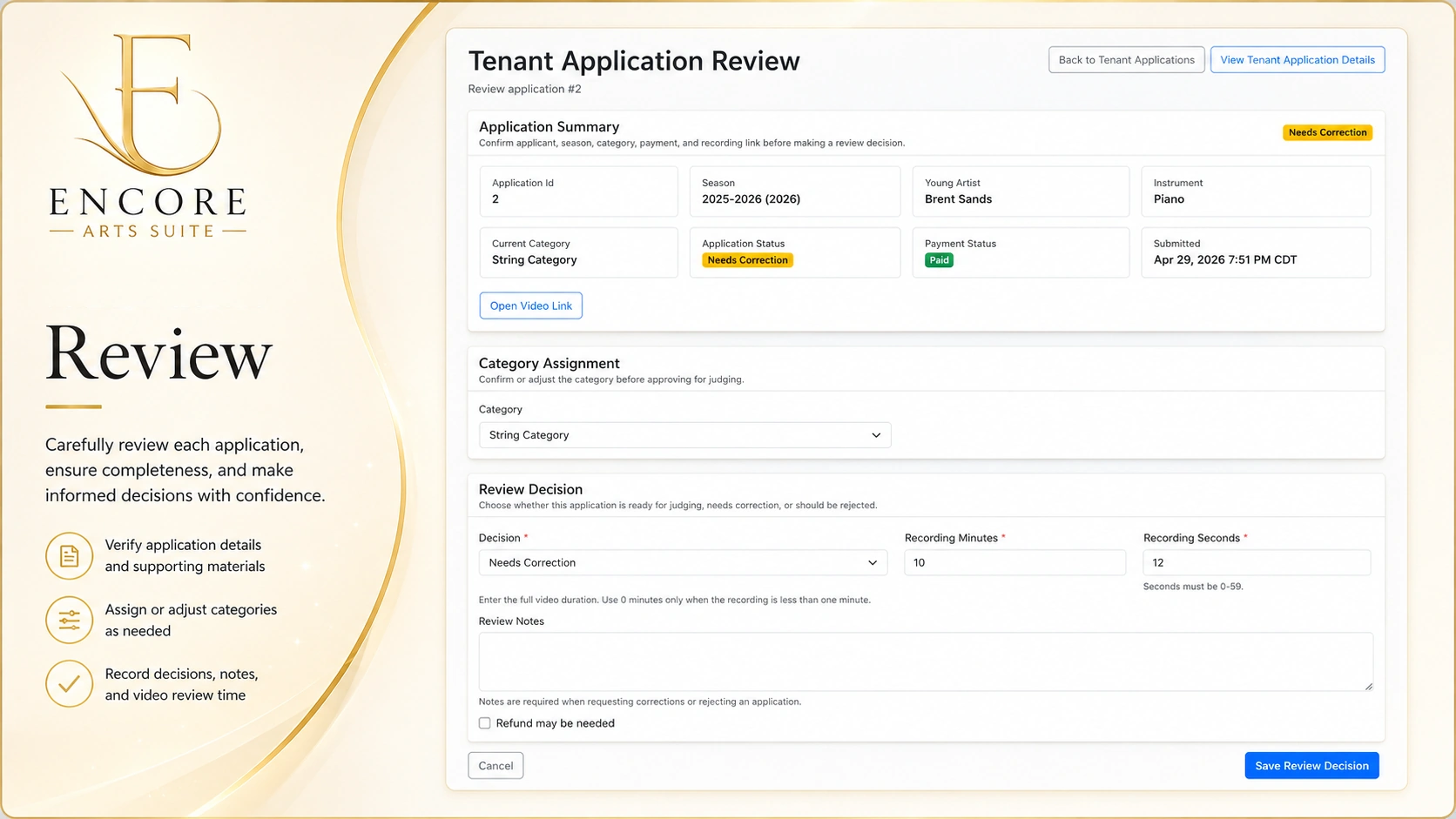
Confirm readiness and resolve corrections
Administrators review each submitted application in context, record the review decision, and preserve the information needed to explain whether it was approved, returned for correction, or rejected.
Confirm Application Details
Review the applicant, season, instrument, payment, submission, and performance-recording information together.
Request Corrections
Return an application when required details, supporting information, or the recording need to be corrected.
Confirm Category and Recording
Verify or adjust the competition category and record the submitted performance duration before judging.
Approve for Judging
Mark an eligible application ready for judge assignment only after the administrative review is complete.
Applications are not approved automatically. An authorized administrator reviews the submitted information and chooses whether the application is ready for judging, needs correction, or should be rejected.
Review decisions and notes remain connected to the application so administrators can understand its status and prior review context.
Coordinate human adjudication from assignment through submission
Coordinate judge assignments, embedded performance recordings, round-specific rubrics, draft reviews, submitted reviews, and completion visibility while preserving human responsibility for every adjudication decision.
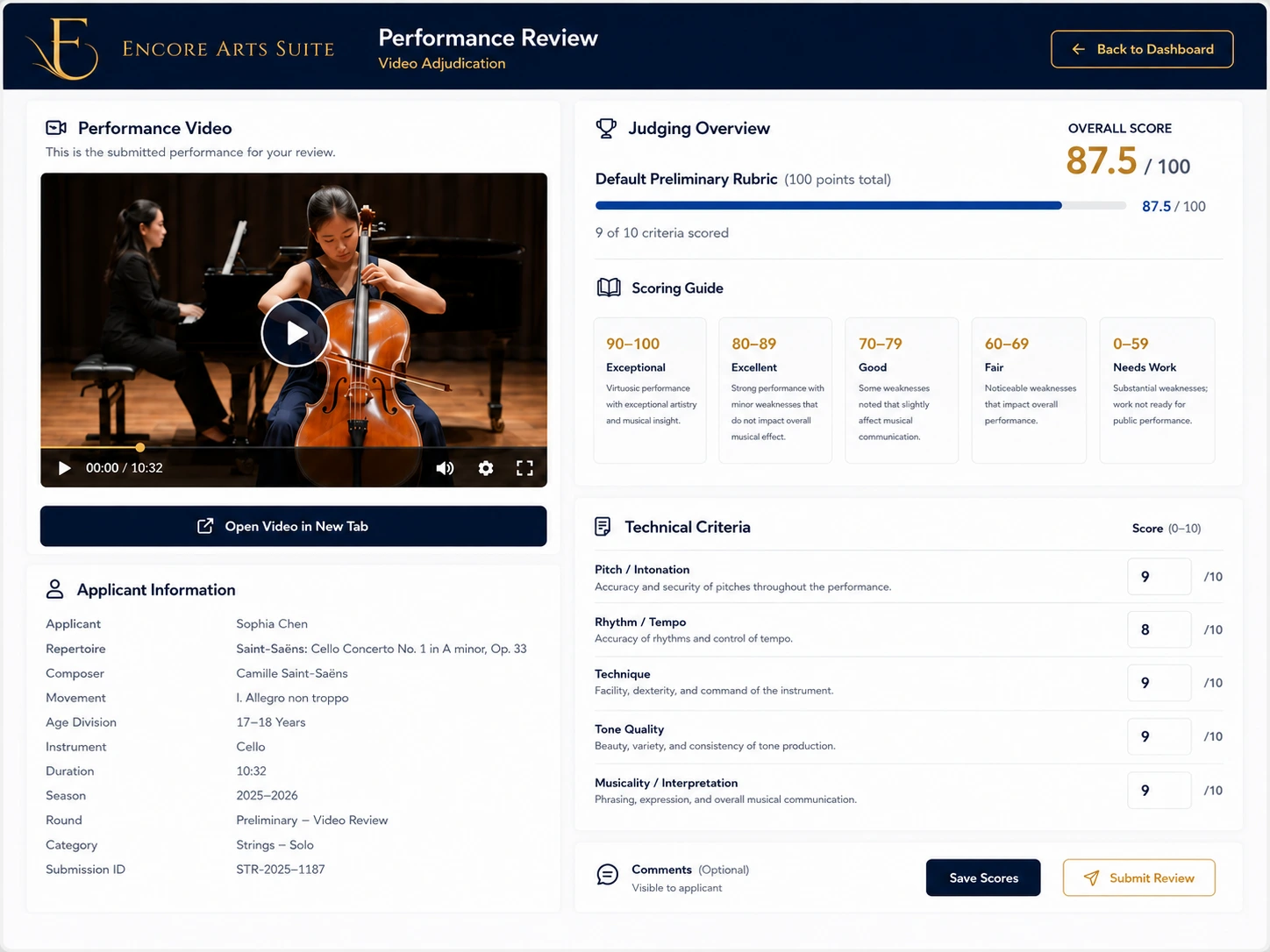
Support judges throughout the review process
Judges can open assigned applications, review the submitted recording, apply the approved rubric, save work in progress, submit the completed review, and help administrators monitor round completion.
Judge Assignments
Connect authorized judges to the appropriate season, judging round, division, category, instrument, or application.
Embedded Recording Review
Review the submitted performance recording alongside applicant, repertoire, and competition information.
Rubric Scoring and Comments
Apply round-specific criteria, scoring guidance, criterion-level scores, and permitted judge comments.
Draft, Submit, and Monitor
Save work in progress, submit completed reviews, and give administrators visibility into review completion.
Judges—not automated AI scoring—remain responsible for scores, comments, recommendations, and decisions. Encore Arts Suite coordinates the workflow and preserves submitted review information; it does not evaluate performances or recommend winners.
Submitted reviews remain connected to the assigned judge, round, rubric, and application so authorized administrators can monitor completion and review the resulting scores.
Advance selected applicants into later rounds
Review completed round results, identify selected applicants, and move them into the next judging stage while preserving prior-round scores, submissions, and review history.
Preliminary Review
Complete assigned human reviews.
Selected Finalists
Administrator selects applicants to advance.
Later Round
Continue with the next approved rubric and assignments.
Preliminary Review
Complete assigned human reviews.
Selected Finalists
Administrator selects applicants to advance.
Later Round
Continue with the next approved rubric and assignments.
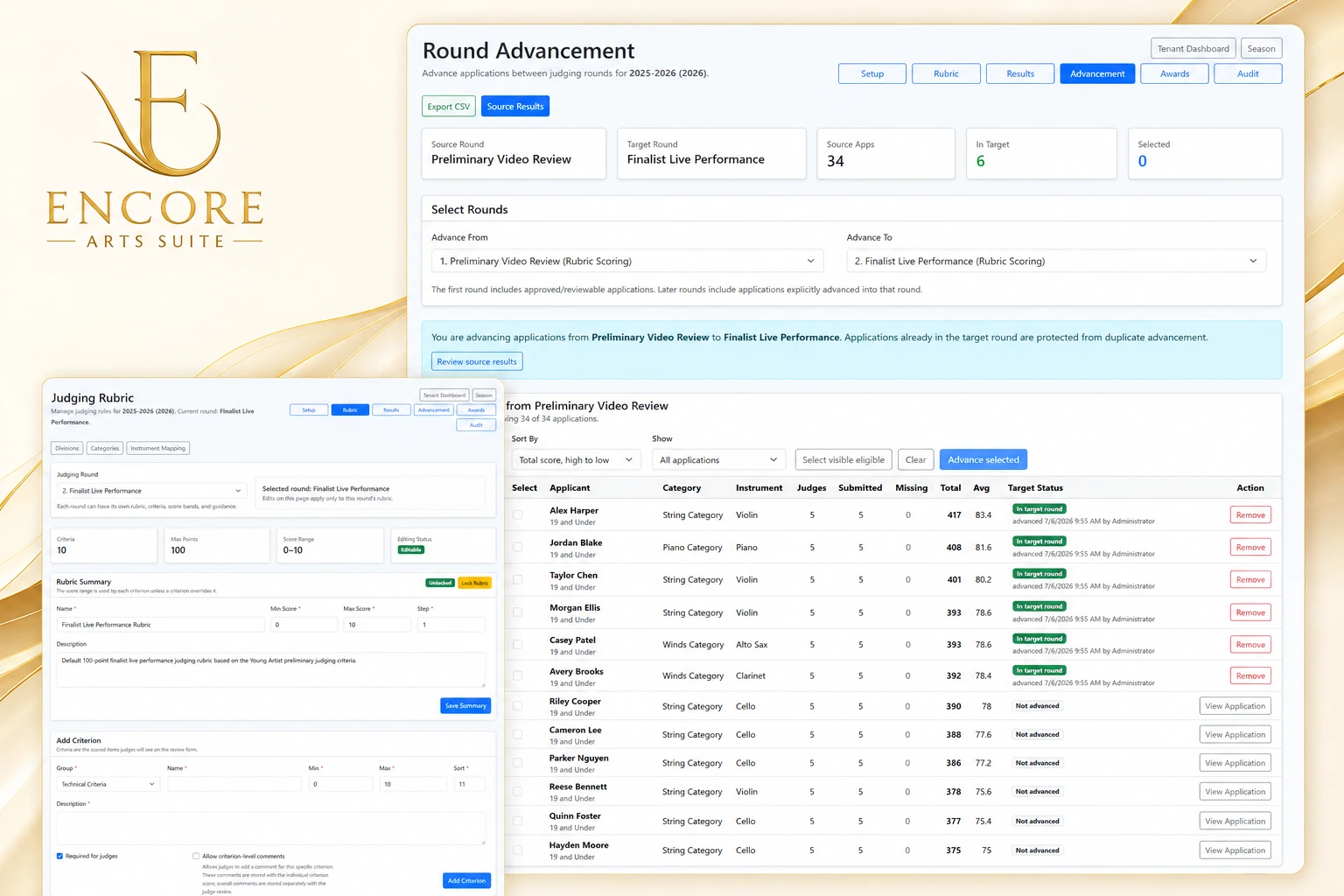
Control advancement without losing prior-round history
Administrators choose the source and target rounds, review eligible applicants and completed scores, select who should advance, and retain the earlier round’s submitted reviews for future reference.
Source and Target Rounds
Choose the completed judging round and the later round that will receive selected applicants.
Finalist Selection
Review eligible applicants and select those authorized to continue into the next stage.
Preserved Prior Reviews
Keep prior-round scores, comments, submitted reviews, and completion information connected to each application.
Next-Round Assignments
Prepare later-round judge assignments and scoring criteria for the applicants who were advanced.
Applicants are not advanced automatically. An authorized administrator reviews the completed round, selects the applicants who should continue, and performs the advancement action.
Advancement creates participation in the later round without replacing or erasing the applicant’s earlier-round review history.
Record awards and complete the season
Record category awards, overall winners, final placements, and the completed season status while preserving the competition’s results and administrative history as a distinct season record.
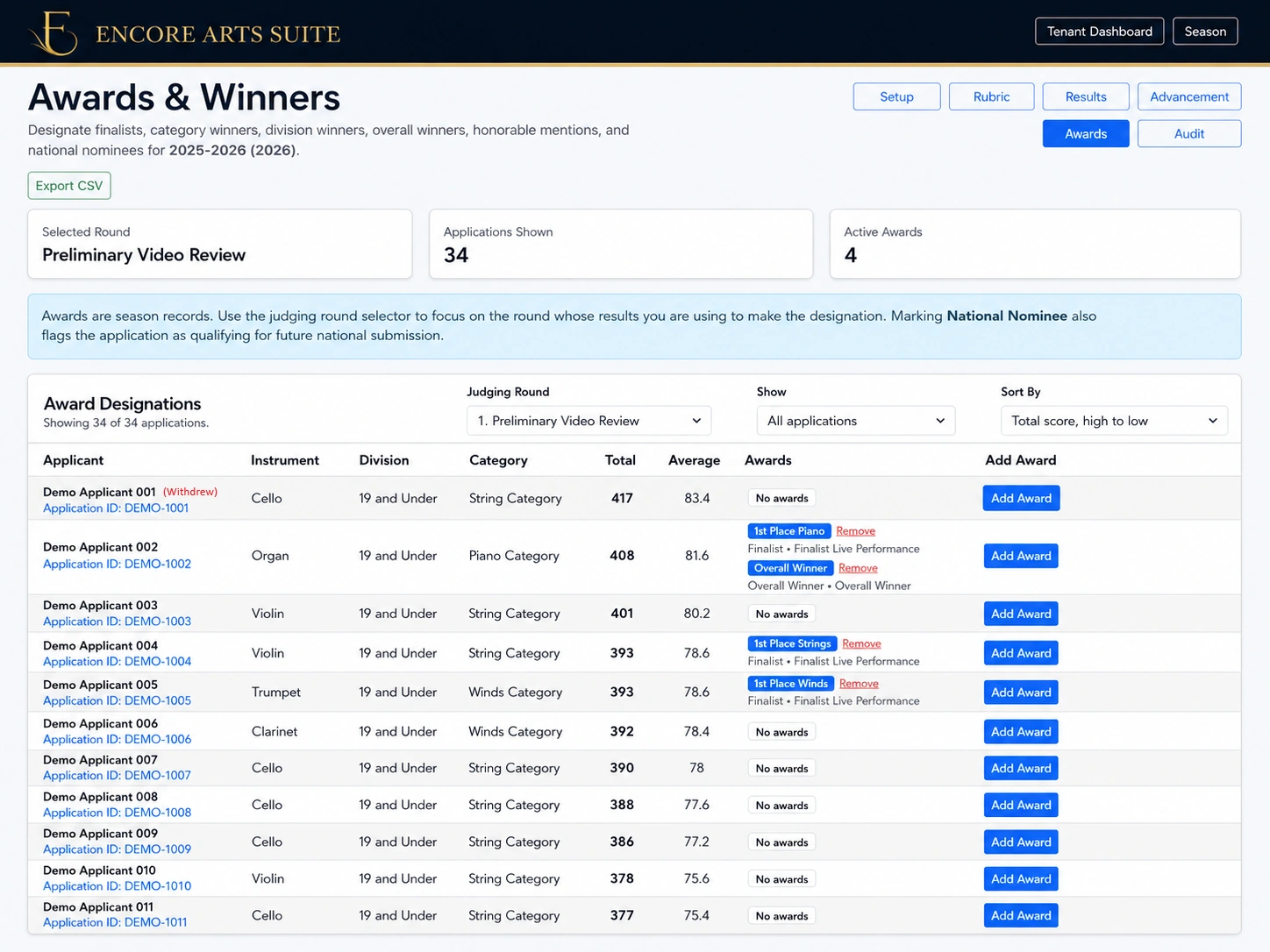
Preserve final outcomes as a completed season record
Administrators designate awards and placements, confirm the season’s final status, and retain the completed competition as its own historical record for future reference.
Category Awards
Record placements and recognitions for applicants within the applicable competition category.
Overall Winner and Final Placements
Designate the overall winner and other approved final placements after the competition decisions are complete.
Season Completion
Change the season to its completed status after awards, placements, and final administrative work are confirmed
Retained Historical Record
Preserve the completed season, applications, reviews, advancement history, awards, and results for later reference.
Award designation and season completion remain administrator-controlled actions. Encore Arts Suite records the decisions entered by authorized staff; it does not automatically select winners, assign awards, complete the season, or publish results.
Starting the next season: The completed season remains preserved as its own historical record. Through the separate Roll Forward action, an administrator may copy eligible configuration—such as divisions, categories, and instrument mappings—into a new season and then review and update that configuration for the next competition cycle.
Maintain visibility and control throughout the competition workflow
Keep season context, participant status, judge assignments, review progress, administrative decisions, and tenant-controlled communications visible as the competition moves from preparation through completion.
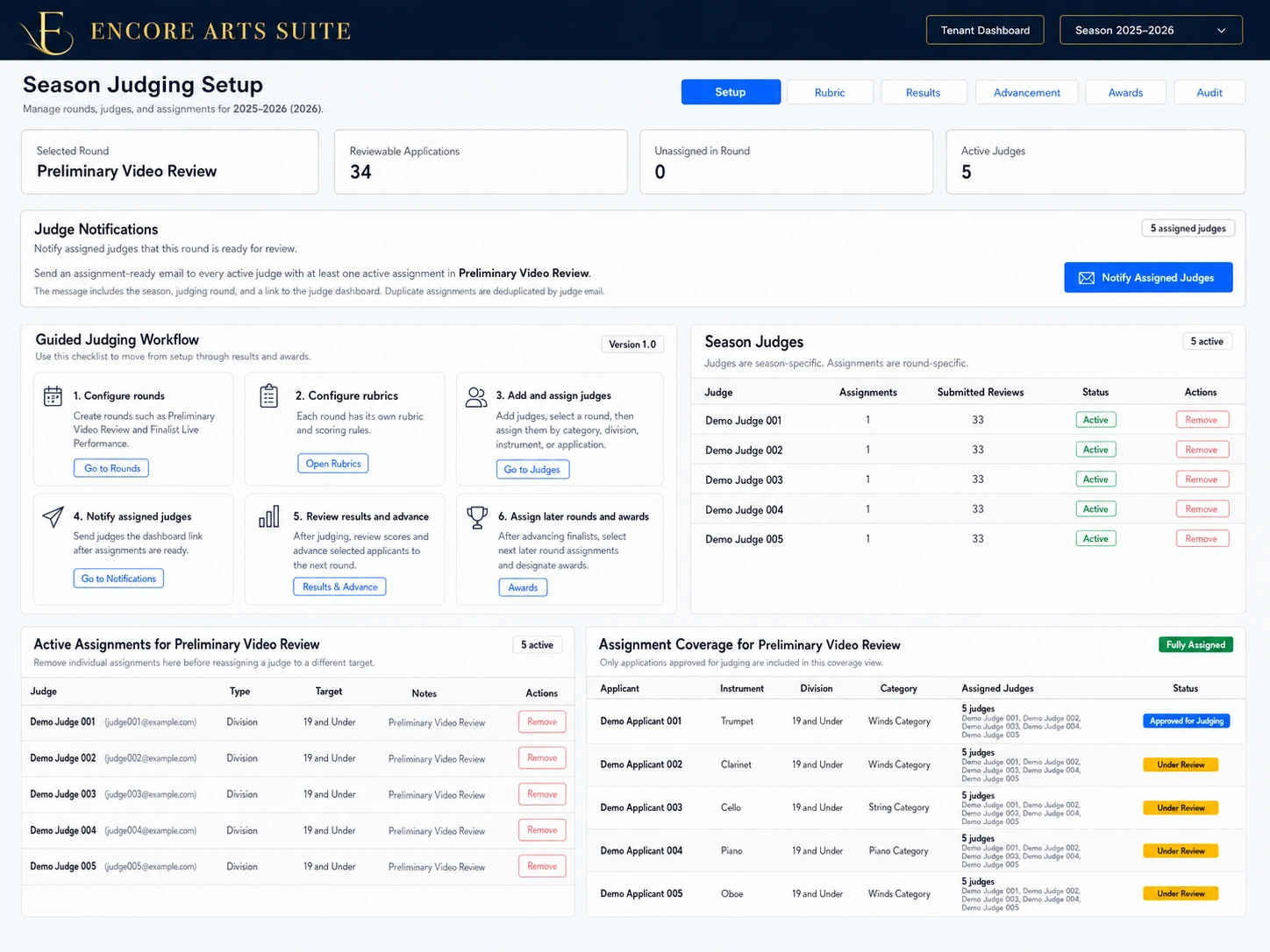
Give administrators a connected operational view
Encore Arts Suite keeps key workflow states connected so authorized administrators can understand what has been configured, submitted, reviewed, assigned, completed, advanced, or recorded within the current season.
Status Visibility
See application, payment, submission, review, judging, advancement, award, and season status in the appropriate administrative context.
Assignment and Completion Tracking
Monitor active judges, assigned applications, submitted reviews, and remaining review coverage within each round.
Tenant-Controlled Communications
Send essential workflow messages and reminders when authorized administrators decide that participants or judges need an update.
Preserved Administrative Context
Keep decisions, statuses, assignments, reviews, advancement actions, awards, and season records connected for later administrative reference.
Operational visibility supports administrative control; it does not replace it. Authorized tenant administrators remain responsible for configuration, approvals, assignments, advancement, awards, completion decisions, and official competition communications.
Version 1.0 communications are operational and transactional. Broader newsletters, recruitment campaigns, social publishing, sponsor promotion, and marketing automation remain outside this workflow.
See how Encore Arts Suite can support your competition workflow
Explore how Encore Arts Suite brings season setup, applications, administrative review, human adjudication, advancement, awards, completion, and operational visibility into one structured competition workflow.
Designed for independent arts organizations managing structured competition seasons.